Nov 2 2026
What are the AIF member tables
The AIF member tables in Data Exchange are used to hold a cached copy of the members (their names, aliases, descriptions and properties) of every application that is registered as a source or a target application, and the main AIF table is the AIF_TARGET_APPL_MEMBERS. There is no direct access to the database in EPM Cloud, but a #SQL mapping can read the table during a data load into FCCS or a data extract from FCCS (e.g. to bring a member property into an extract).
The use case
When you’re sending a trial balance extract to a downstream system, it’s common to be asked for the account alias and the account type beside each balance (so the receiving system doesn’t have to look them up separately). Both properties already exist on the account members in FCCS, so looking them up from AIF_TARGET_APPL_MEMBERS avoids maintaining a separate mapping table that has to be updated every time an account is added.
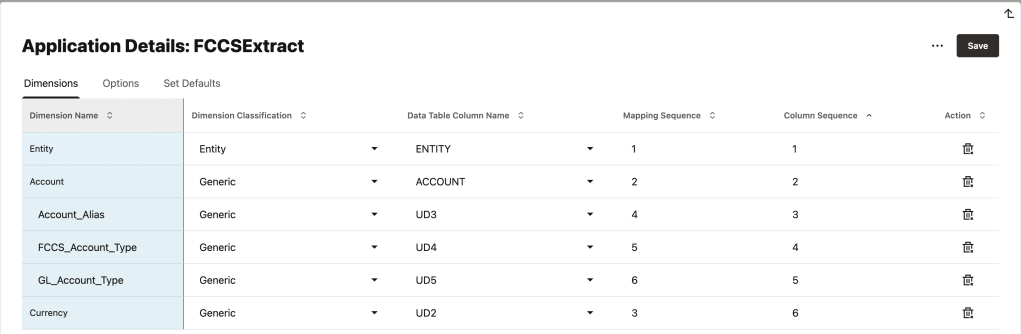
In this example, 3 columns are added to the Data Export to File application, and each one uses the account as its source and a #SQL mapping to return the value.
- ‘Account_Alias’ – the alias of the account, looked up from the FCCS application
- ‘FCCS_Account_Type’ – the account type of the account, looked up from the FCCS application
- ‘GL_Account_Type’ – the account type of the account, looked up from the Cloud GL chart of accounts
The three columns added to the Data Export to File application
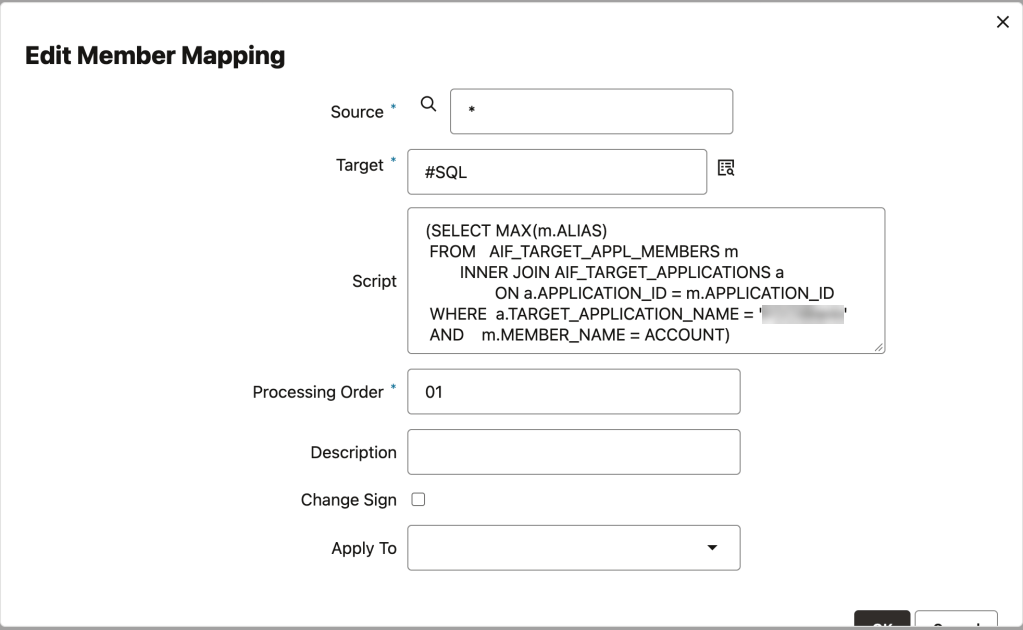
The script below returns the alias of each account by matching on ACCOUNT (the account on the current row) and filtering on the name of the FCCS application, since the same account number can be cached by more than one registered application.
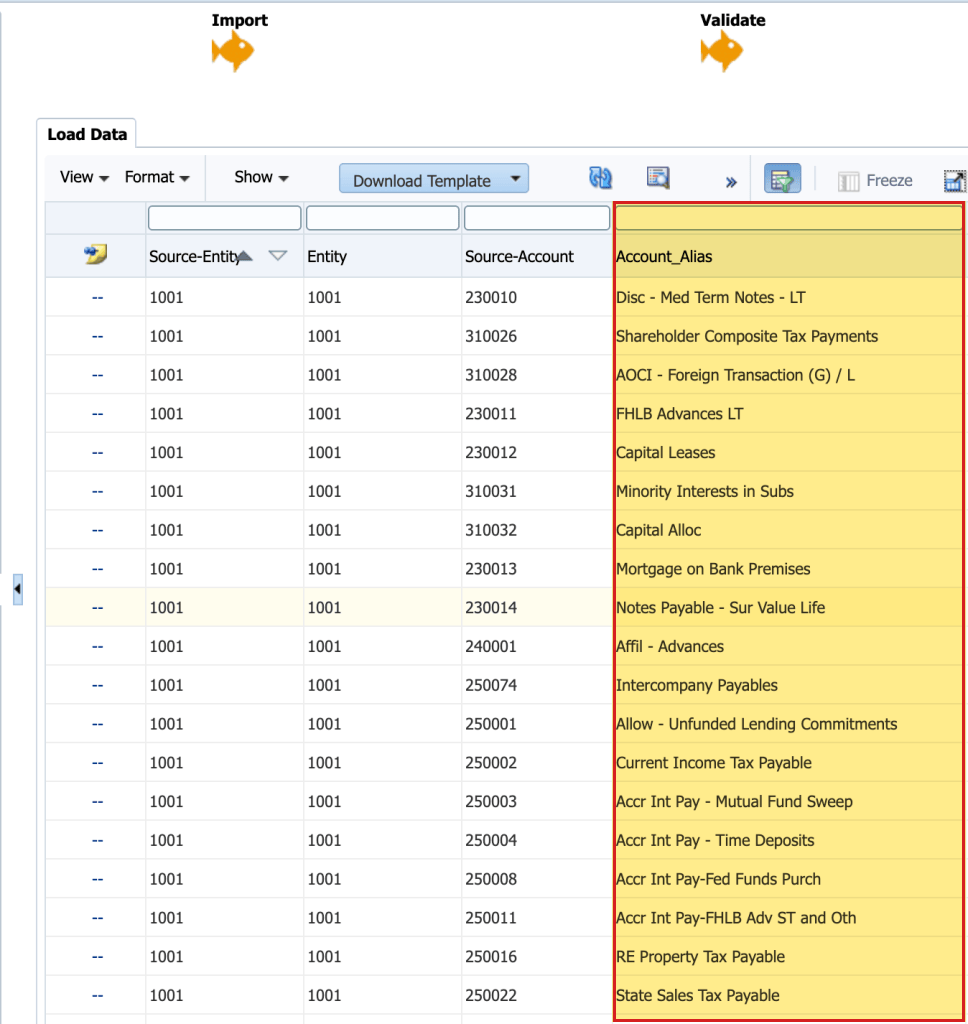
With the filter in place, each account matches a single row in the table and the alias comes back for every account in the extract.
The #SQL mapping on the ‘Account_Alias’ column
The extract with ‘Account_Alias’ populated for every account
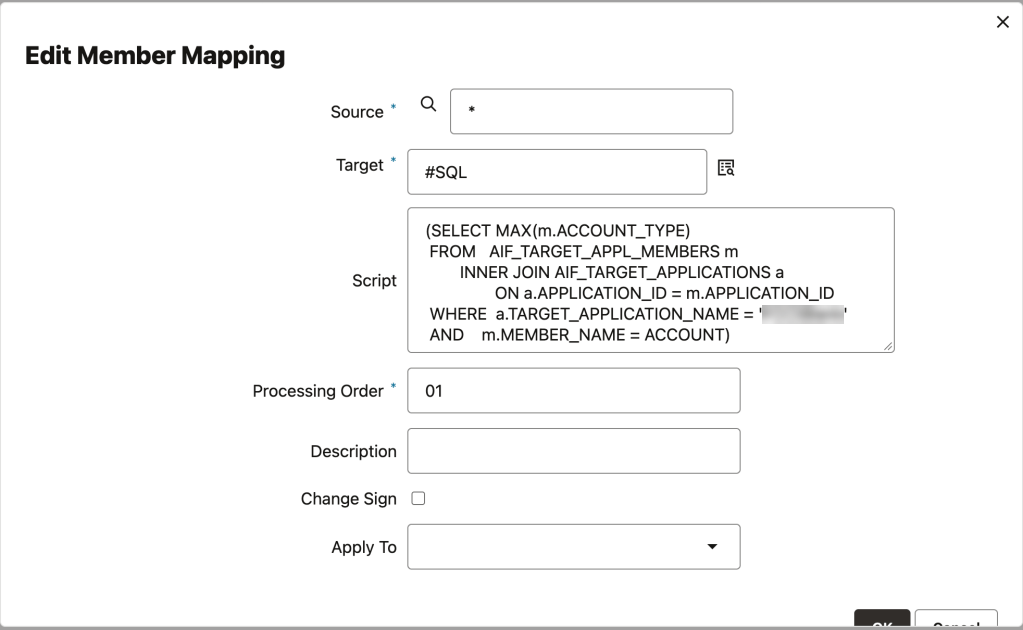
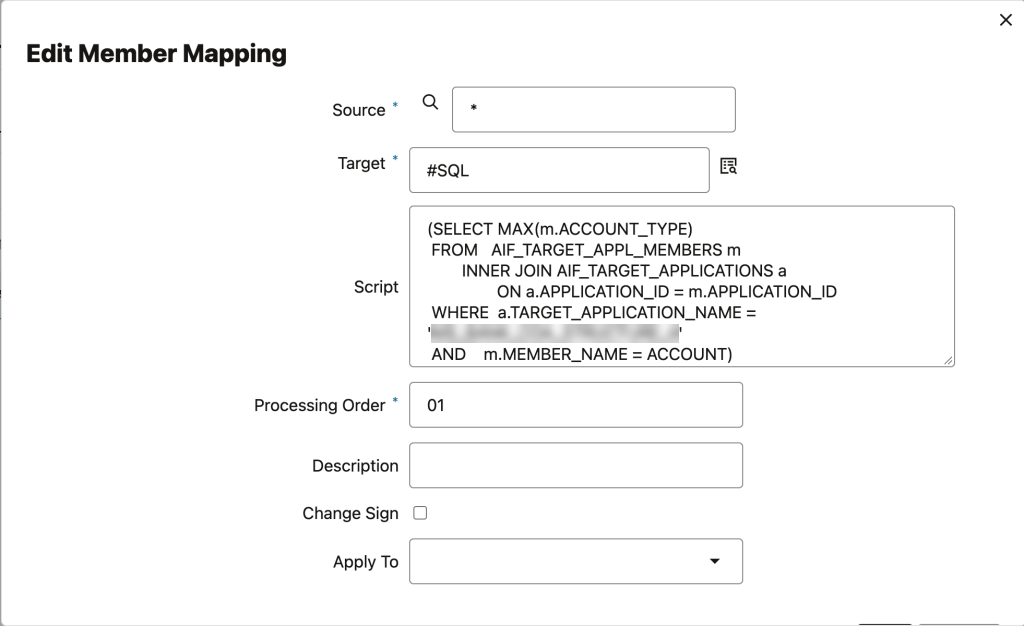
The same script with ACCOUNT_TYPE in place of ALIAS returns an empty value for every account, even though the account type is set on each of these members in FCCS (e.g. Asset or Liability).
The #SQL mapping on the ‘FCCS_Account_Type’ column
The ‘FCCS_Account_Type’ column in the extract, with every value empty
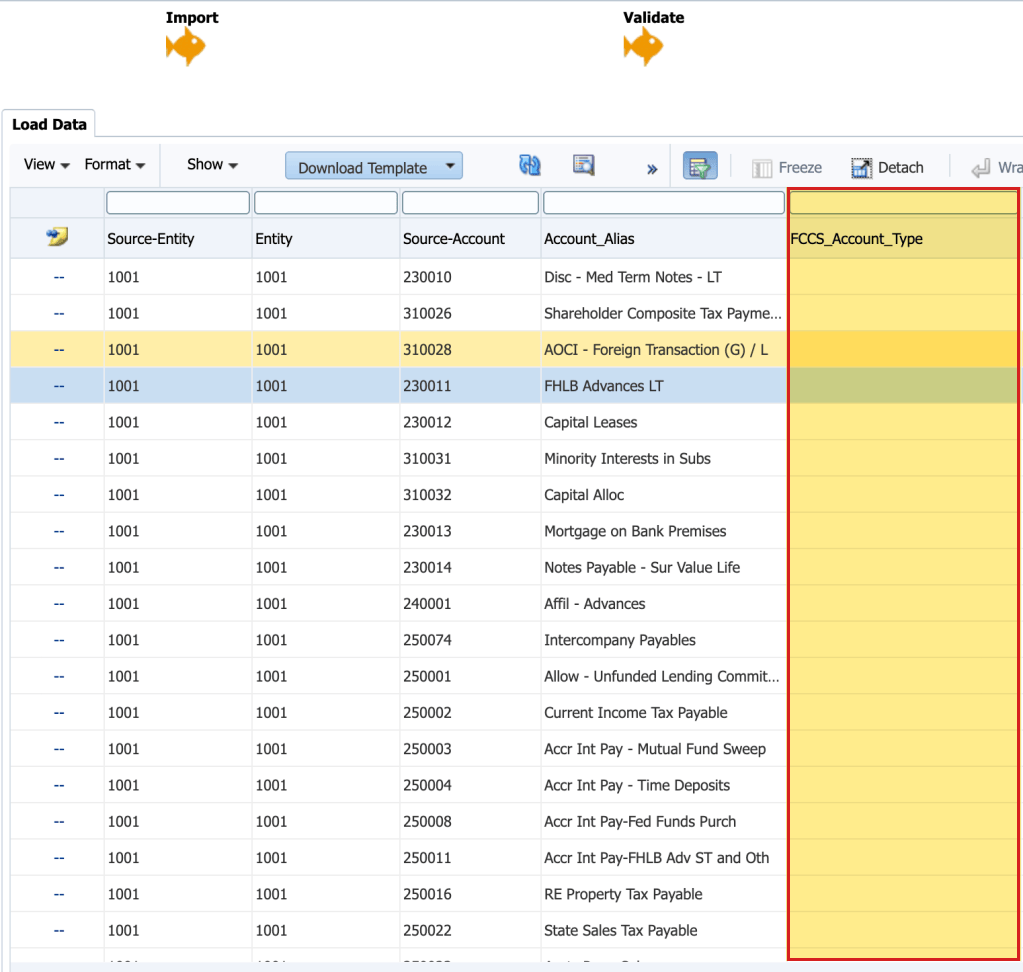
Counting the rows and the column separately shows why this happens, because COUNT(*) returns 1 for each account (so the member is cached in the table) while COUNT(ACCOUNT_TYPE) returns 0 (so the account type on that row is empty). The SQL query below can be used to test this in your own application.
(SELECT COUNT(m.ACCOUNT_TYPE) FROM AIF_TARGET_APPL_MEMBERS m INNER JOIN AIF_TARGET_APPLICATIONS a ON a.APPLICATION_ID = m.APPLICATION_ID WHERE a.TARGET_APPLICATION_NAME = 'YourFCCSApp' AND m.MEMBER_NAME = ACCOUNT)
So Data Exchange caches the alias of each account for the FCCS application, but it doesn’t cache the account type.
Account type from the Cloud GL chart of accounts
The Cloud GL chart of accounts is also registered in Data Exchange (as a source), and pointing the same script at that application returns the account type, with the application name as the only change to the script.
The GL account type only makes sense when the FCCS chart of accounts uses the same account numbers as the GL chart of accounts, because the lookup matches on the account number in both applications. If the FCCS accounts are mapped from the GL accounts instead (e.g. to a different numbering), the lookup returns nothing, or the type of an unrelated GL account that happens to share the same number.
The #SQL mapping on the ‘GL_Account_Type’ column
The ‘GL_Account_Type’ column in the extract, listing Asset, Expense, Liability and Owner’s Equity
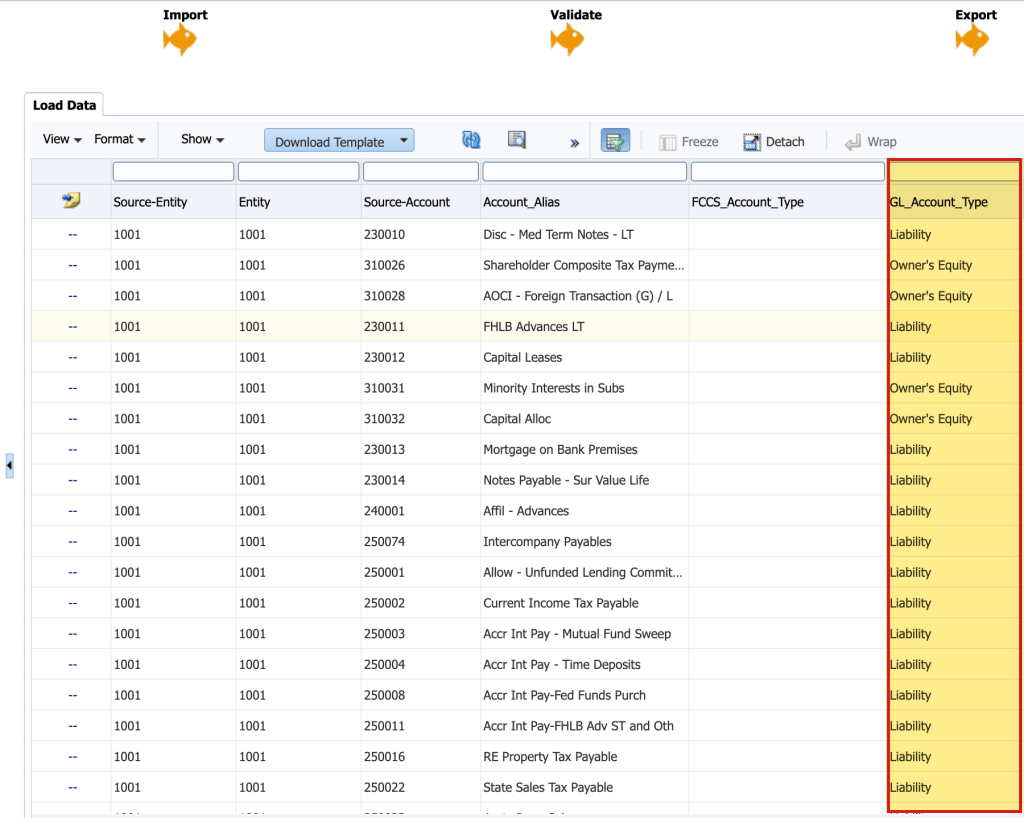
In this example, ‘GL_Account_Type’ comes back for every account that exists in the GL chart of accounts, and the values match the account types that are set on the same accounts in FCCS. Any account that exists only in FCCS (e.g. the equity pickup accounts created in FCCS) still returns a blank ‘GL_Account_Type’, since there’s no matching account in the GL chart of accounts for the lookup to find.
Conclusion
Looking up the alias in the FCCS application will add it to a Data Exchange extract – The #SQL mapping reads the cached alias for each row, so there’s no separate mapping table to maintain as accounts are added
Looking up the account type in the FCCS application returns an empty value – The member is cached in the table (so COUNT(*) returns 1), but the account type on that row is empty
Looking up the account type in the Cloud GL chart of accounts will return it for the same accounts – The values match FCCS as long as both applications use the same account numbers, and accounts that exist only in FCCS come back blank
Counting the rows and the column separately is a quick way to confirm which registered application holds a property, before an extract is built around a column that comes back empty.


Leave a Reply