Nov 24, 2026
What is the Pivot Dimension in Data Exchange?
The Pivot Dimension option in a Data Export to File application is used to rotate rows into columns, so that each member of the selected dimension becomes its own amount column (e.g. the periods Jan to Dec, which is the example in Oracle’s documentation). The option takes only one dimension from the export file, which works when each column is a single member, but how does this work when the pivot needs to happen on more than 1 dimension?
The use case
When you’re sending balances from FCCS to a downstream system (e.g. a regulatory reporting tool or a data warehouse), it’s common to be asked for several balances of the same account on one row, rather than one row for each balance. Each of those balances is a combination of members (e.g. the closing balance is ‘FCCS_YTD’ in the View dimension combined with ‘FCCS_ClosingBalance’ in the Movement dimension), so pivoting the View dimension or the Movement dimension on its own can’t separate them.
In this example, the extract returns 2 balance types for each account as 2 amount columns.
- ‘Closing_Balance’ – the ‘FCCS_YTD’ view combined with the ‘FCCS_ClosingBalance’ movement
- ‘Period_Activity’ – the ‘FCCS_Periodic’ view combined with the ‘FCCS_Mvmts_Total’ movement
Setting up the dimensions
Two dimensions are added to the Data Export to File application:
- ‘Balance_Type’ – a Generic dimension that the View dimension maps to, which holds the name of the balance type and is the dimension that gets pivoted into columns (so it needs a column sequence)
- ‘LKP_Movement’ – a Lookup dimension that the Movement dimension maps to, which carries the movement onto each row for the mapping to read without writing it to the file
The ‘Balance_Type’ and ‘LKP_Movement’ dimensions in the Data Export to File application
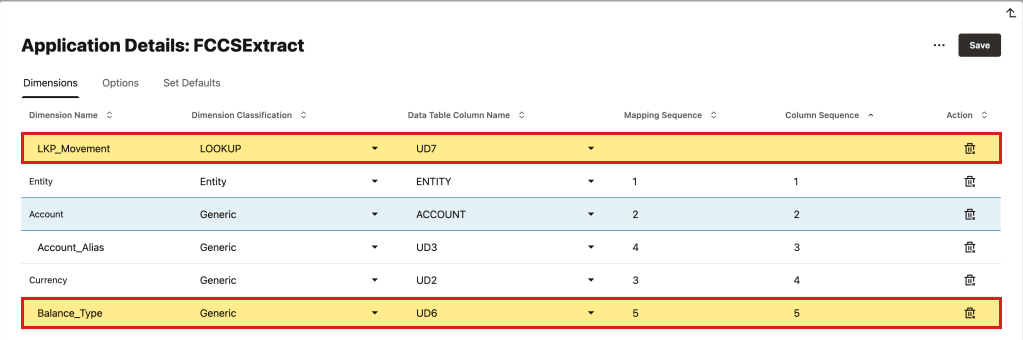
The lookup matters because pivoting forces Accumulate Data to Yes, so the system groups rows by every column left in the file – and if Movement were one of those columns, each account would stay on 2 rows instead of 1.
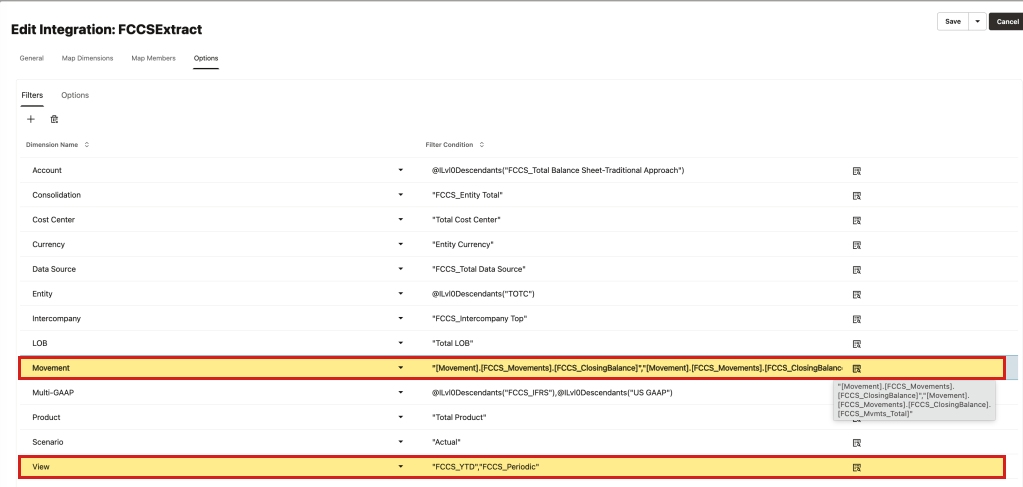
The source filters are set as ‘FCCS_YTD’ and ‘FCCS_Periodic’ for View, and ‘FCCS_ClosingBalance’ and ‘FCCS_Mvmts_Total’ for Movement:
Setting the source filters for the extract
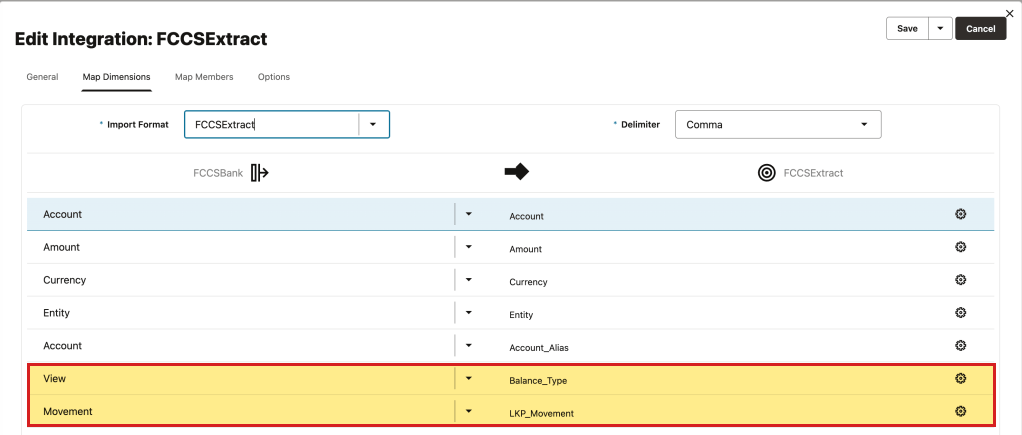
In Map Dimensions of the integration, ensure that View is mapped to ‘Balance_Type’ and Movement is mapped to ‘LKP_Movement’.
View mapped to ‘Balance_Type’ and Movement mapped to ‘LKP_Movement’ in Map Dimensions
Naming each balance type with a CASE mapping
A #SQL mapping on ‘Balance_Type’ reads the source View and the source Movement on each row, and returns the name of the balance type that the combination belongs to.
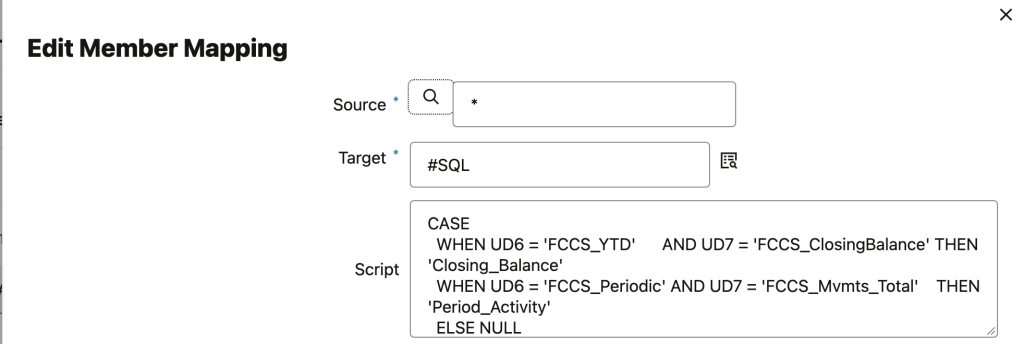
UD6 and UD7 are the data table columns of ‘Balance_Type’ and ‘LKP_Movement’ (so they hold the source View and Movement), and the filters return all 4 combinations of the 2 views and 2 movements, of which the extract needs only 2.
In this example, each account comes out as a single row with ‘Closing_Balance’ and ‘Period_Activity’ side by side. For balance sheet accounts the 2 columns differ (since the closing balance carries the prior period’s balance forward), while for income statement accounts they’re the same in January, because those accounts start each fiscal year at zero.
Pivoting the balance types into columns
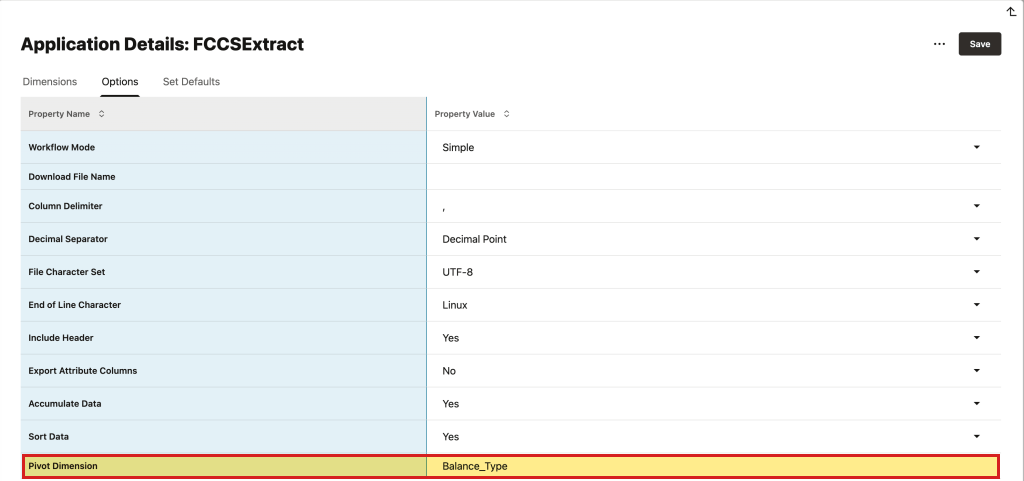
Setting Pivot Dimension to ‘Balance_Type’ in the target application options is the only other change, and the system builds the pivot from the distinct names that the CASE returns.
What happens to the combinations that aren’t needed?
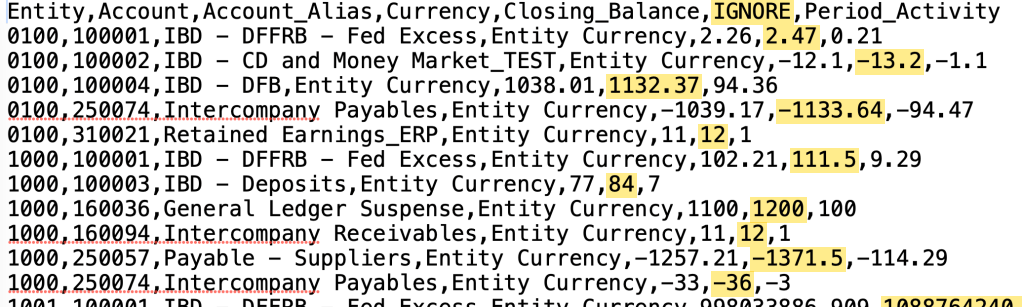
The 2 combinations that aren’t balance types (‘FCCS_YTD’ with ‘FCCS_Mvmts_Total’, and ‘FCCS_Periodic’ with ‘FCCS_ClosingBalance’) still come back from the source, and the CASE has to return something for them. Returning ‘IGNORE’ doesn’t remove them, because the system treats it as one more name to pivot, so the file gains an ‘IGNORE’ column that holds the sum of both unwanted combinations.
The output file with ELSE ‘IGNORE’
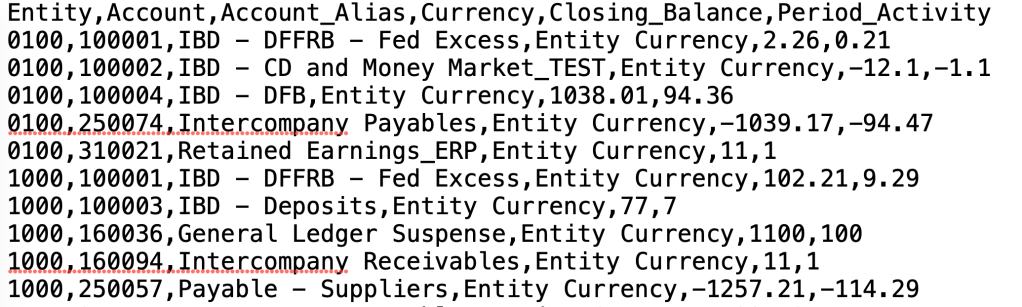
Returning NULL keeps them out of the file, since the system only pivots the names that aren’t null. In the Full workflow mode, though, validation reports the null as an unmapped ‘Balance_Type’ and stops the load, so the integration has to run in the Simple workflow mode for NULL to work.
The output file with ELSE NULL
Conclusion
A CASE mapping can be used to turn a combination of dimensions into a named balance type – It reads the source View and Movement on each row, and the name it returns becomes the column that the balance type is pivoted into
Pivoting the ‘Balance_Type’ dimension will put each balance type in its own column – Each account collapses into a single row because Movement travels as a lookup
Returning NULL for the unwanted combinations will keep them out of the file – ‘IGNORE’ becomes a column of its own, and NULL only works when the integration runs in the Simple workflow mode
The same approach works for any balances that can be described as a combination of members (e.g. local and reporting currency), with one more line in the CASE mapping for each balance type and a lookup for any new dimension that the CASE reads.


Leave a Reply